There is a kind of frontend problem that is very easy to miss.
The page looks good.
The animations are smooth on your laptop. The layout matches the design. The breakpoints appear to work. You open DevTools, switch to an iPhone-sized viewport, and everything seems fine.
So you move on.
That was the Razor Wallet landing page.
I picked up the desktop design and built everything from there.
Tablet and mobile behaviour, all the way down to 320px. How the layout held together zoomed out to 25%. The micro-animations on the buttons, the shooting star, the card sequence in the third section. Typography, interactions, the production build.
Visually, it was finished.
Then I stopped looking at the page and started looking at what the browser was being asked to download. The numbers were uncomfortable.
One decorative SVG, sitting behind a feature card, was 3,954.9 KB.
Not the page. One illustration, heavier than most complete websites. No lazy attribute. No responsive variants. No conditional load. Every visitor fetched it immediately, phone or not.
It was not alone. Nine illustrations accounted for 10.5 MB of an 11.16 MB build.
What a slow money page actually costs #
Before the technical part, it is worth being precise about why this matters, because "performance is important" is the kind of claim everyone nods at and nobody acts on.
There is one study I keep returning to, because it is a controlled experiment rather than a correlation.
Vodafone ran an A/B test on a landing page. Two versions, visually and functionally identical. The only difference was that version A had been optimised for Core Web Vitals and scored 31% better on LCP in the field. The result was 8% more sales, a 15% improvement in their lead to visit rate, and an 11% improvement in their cart to visit rate.
Same audience. Same page. Same offer. The faster one sold more.
That test is published on web.dev, and what makes it useful is that it prices rendering speed in isolation. Nothing else varied.
The second is Deloitte and Google's Milliseconds Make Millions, which analysed 30 million user sessions across 37 brands. A 0.1 second improvement in mobile site speed was associated with retail conversions increasing by 8.4% and average order value increasing by 9.2%. Travel conversions rose 10.1%, and lead generation information pages saw bounce rates improve by 8.3%.
A tenth of a second. The report is on Deloitte's site.
For a wallet or a fintech product the mechanism is worth spelling out, because it is not really about patience. Someone landing on a wallet page is making a trust decision. They are deciding whether this is a product they will connect an account to, download, or move money through. If the browser is still fetching decorative artwork, that decision has not started. You have not lost them at checkout. You lost them before the conversation began.
And then there is the part nobody writes about #
I build from Lagos, and there is a cost here that neither of those studies captures.
In Nigeria a lot of people buy mobile data pay-as-you-go. MTN's published pay-as-you-go rate is ₦3.07 per megabyte. Their ₦350 one-day bundle works out at roughly ₦0.34 per megabyte.
So here is what one view of that landing page cost the person visiting it.
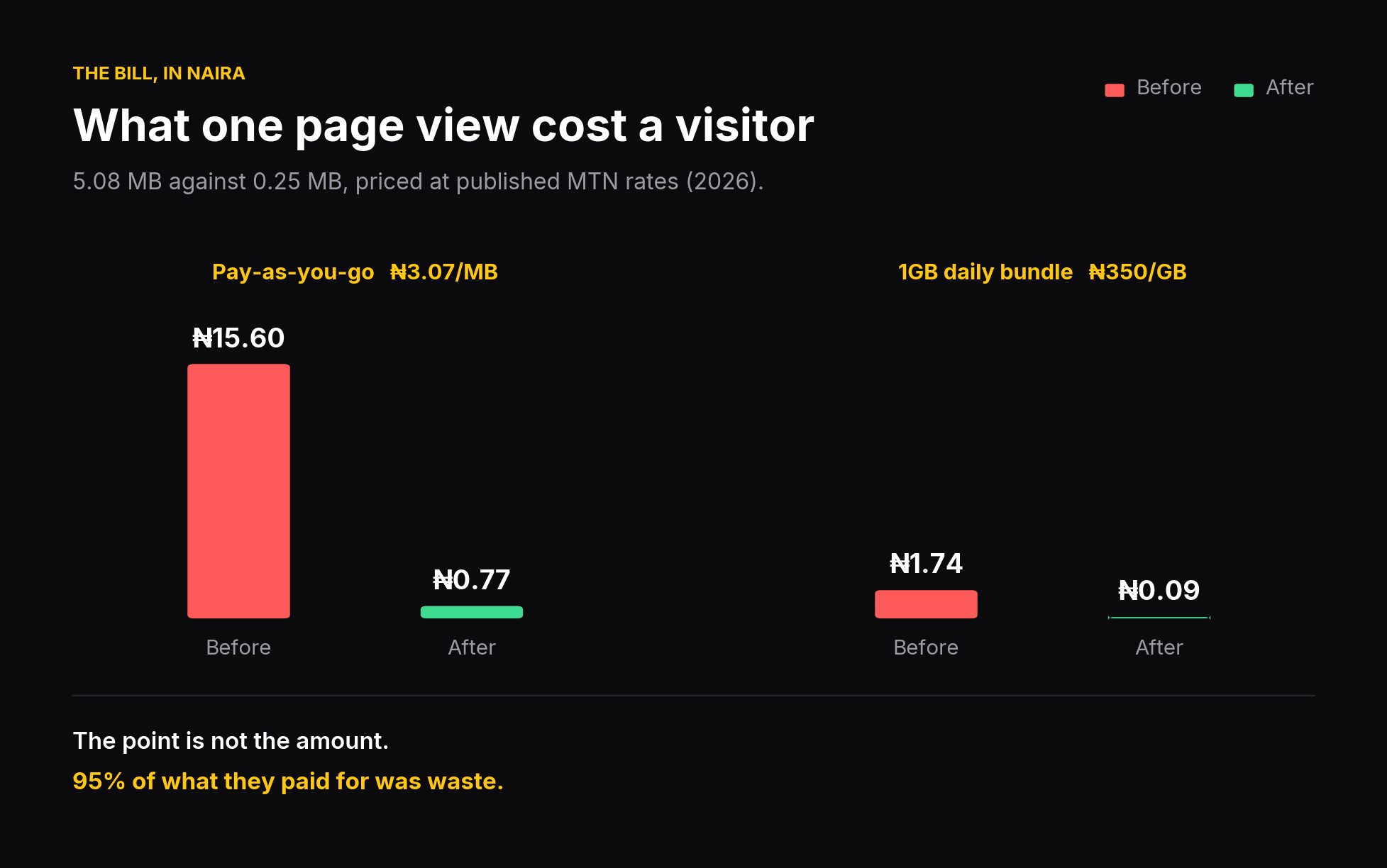 What one page view cost a Nigerian visitor, before and after, at published MTN rates
| 5.08 MB (before) | 0.25 MB (after) | |
|---|---|---|
| Pay-as-you-go at ₦3.07/MB | ₦15.58 | ₦0.77 |
| Daily bundle at ₦350/GB | ₦1.73 | ₦0.09 |
I want to be careful here, because it would be easy to turn this into melodrama. ₦15 is not ruinous. That is not the point.
The point is that the visitor paid for 5.08 MB and received about 0.25 MB worth of actual page. Roughly 95% of what they bought was waste, and they bought it before they knew whether they wanted the product.
The wider context is not moving in their favour either. Nigerian data tariffs rose sharply in 2025, with 1GB moving from roughly ₦287 to ₦431.25. Every megabyte a page does not need is a cost a developer quietly passes to a user who never agreed to it.
This is also, I think, the honest reason people in markets like mine tend to care about payload more than the average performance post suggests. It is not a discipline. It is a bill.
How I measured it #
The short version: build the old commit and the new commit as production bundles, serve both at the same time on different ports, load each, and read what the browser reports it downloaded.
const res = performance.getEntriesByType('resource');
const encoded = res.reduce((a, r) => a + (r.encodedBodySize || 0), 0);
const decoded = res.reduce((a, r) => a + (r.decodedBodySize || 0), 0);

console.table({
  requests:  res.length,
  encodedKB: Math.round(encoded / 1024),  // over the wire
  decodedKB: Math.round(decoded / 1024),  // after gunzip
});
Then re-run the whole thing against the two live deployments, because localhost lies in at least three specific ways. The full rig, and the four traps I walked into personally, are in the appendix at the end of this post.
What "baseline" and "current" mean below #
Two words do a lot of work in the tables that follow, so let me pin them down.
Baseline is commit f01c05c: the page exactly as it shipped, before any of this work. Current is commit 45c37d5: the same page after it.
Both were built as production bundles, and both are still live behind those two links. I have left the old one up on purpose. Every figure below was measured twice, once locally and once against those URLs, so you can open either page and run the numbers yourself rather than taking mine. Where I say something was verified in production, that is what I mean.
Everything below is measured. Nothing is estimated.
The wrong suspect #
I was fairly sure the animation library was the problem.
There is a reasonable amount of GSAP on this page. Micro-animations on every button, a shooting star in the second section, a staggered card sequence in the third. It is the flashy dependency, it is what you notice in the import list, and there is a well-worn genre of blog post about trimming animation code.
So that is where I looked first.
Here is what the build actually contained.
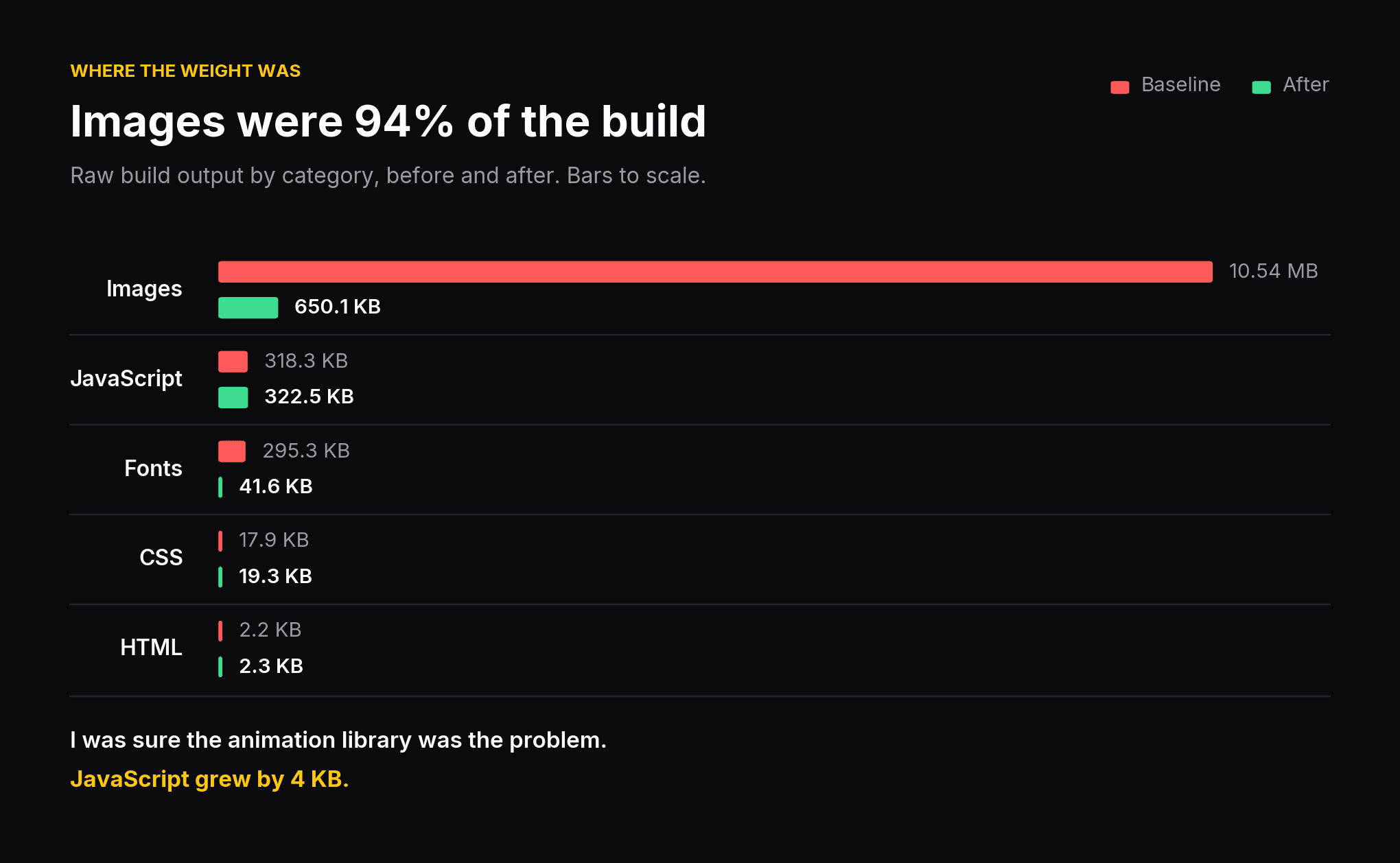 Raw build output by category, baseline against current
| Category | Baseline raw | Current raw | Note |
|---|---|---|---|
| Images | 10.54 MB | 650.1 KB | the whole problem |
| JavaScript | 318.3 KB | 322.5 KB | grew by 4 KB |
| CSS | 17.9 KB | 19.3 KB | grew slightly |
| Fonts | 295.3 KB | 41.6 KB | 10 files to 1 |
| HTML | 2.2 KB | 2.3 KB | |
| Total | 11.16 MB | 1.01 MB | −90.9% |
JavaScript moved by four kilobytes across the entire project. It went up.
Every hour I might have spent hand-optimising animation code would have been an hour spent on a file accounting for under 3% of the build.
The most visible code is not the most expensive code, and there is no way to know which is which without looking. This is the line that settled it:
const by = {};
performance.getEntriesByType('resource').forEach(r => {
  const ext = r.name.split('?')[0].split('.').pop().toLowerCase();
  by[ext] = (by[ext] || 0) + (r.encodedBodySize || 0);
});
console.table(by);
It took under a minute to write. I ran it after two days of assuming.
Why SVG was the wrong format here #
I want to be careful with this section, because "SVG bad" is not the lesson and would be a bad lesson.
SVG wins on flat geometric artwork. Icons, logos, line diagrams. A small number of shapes, flat fills, scales to any density for free, stays editable.
SVG loses badly on dense gradient meshes, because every gradient stop is text the browser parses, holds in memory, and rasterises on every paint.
Two of these files were emphatically the second case:
| File | Paths | Gradient definitions | Size |
|---|---|---|---|
leftSpiral.svg | 1,656 | 3,310 | 857.2 KB |
rightSpiral.svg | 1,857 | 3,712 | 966.0 KB |
Those are not icons. They are photographic-density compositions stored as vector text.
And nothing in the page changed their colour, morphed their paths, or animated their internals. They did not need to stay editable at runtime.
They were pictures.
The decision generalises, so here it is as a flowchart rather than a paragraph:
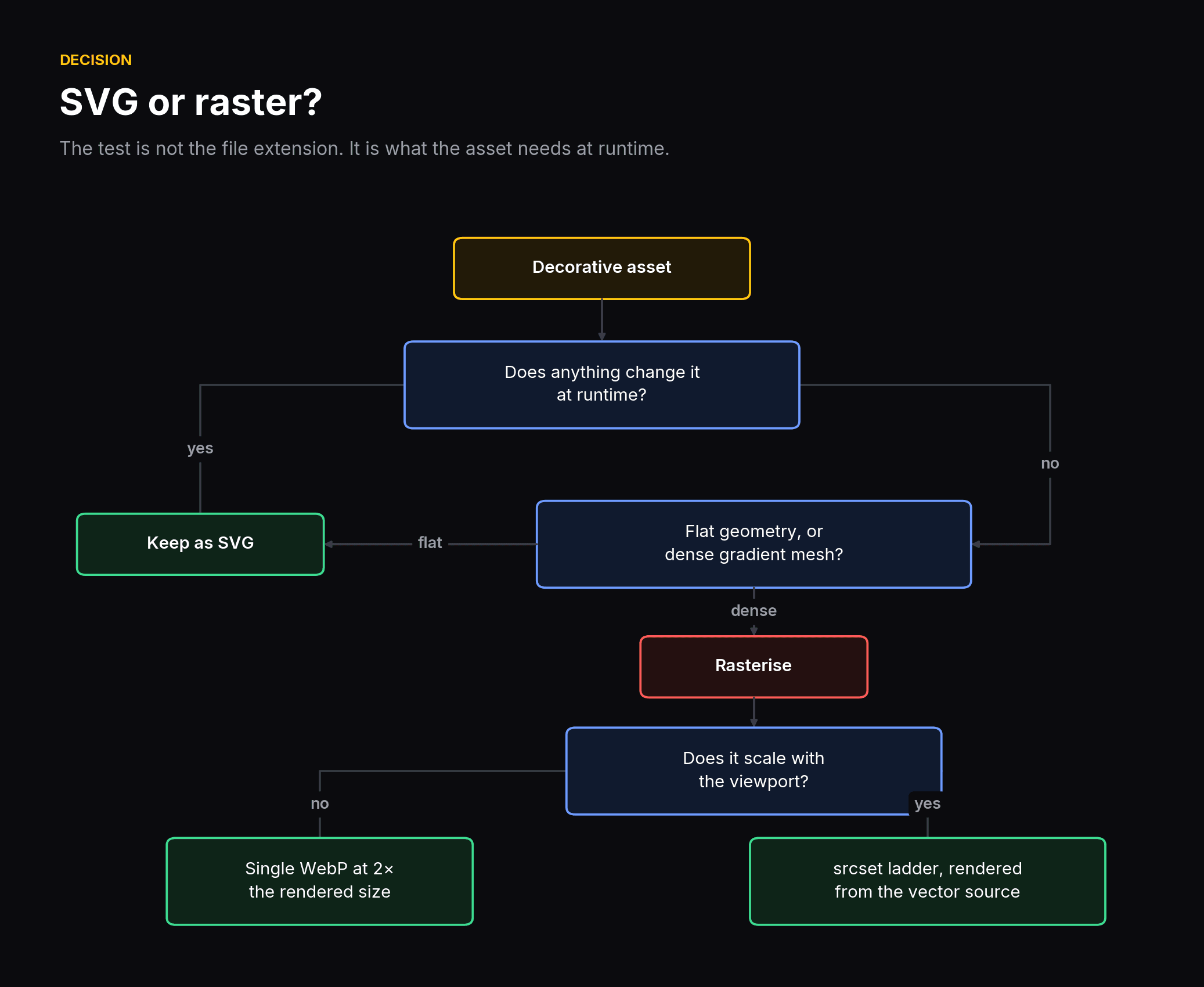 Decision tree for choosing between SVG and a rasterised format
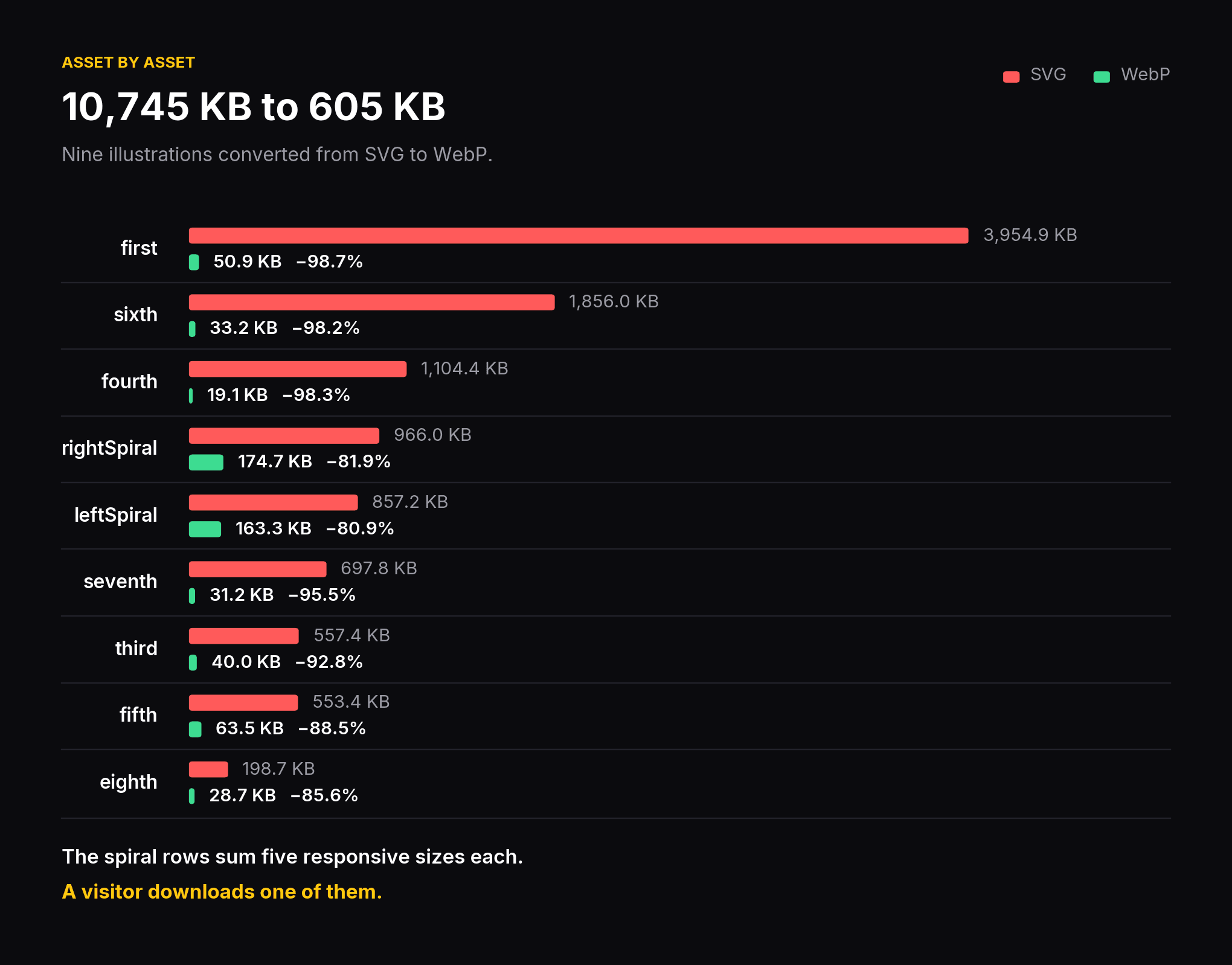 Nine illustrations converted from SVG to WebP
| Asset | Before | After | Saved |
|---|---|---|---|
| first | 3,954.9 KB | 50.9 KB | 98.7% |
| sixth | 1,856.0 KB | 33.2 KB | 98.2% |
| fourth | 1,104.4 KB | 19.1 KB | 98.3% |
| rightSpiral | 966.0 KB | 174.7 KB | 81.9% |
| leftSpiral | 857.2 KB | 163.3 KB | 81.0% |
| seventh | 697.8 KB | 31.2 KB | 95.5% |
| third | 557.4 KB | 40.0 KB | 92.8% |
| fifth | 553.4 KB | 63.5 KB | 88.5% |
| eighth | 198.7 KB | 28.7 KB | 85.5% |
| Total | 10,745.7 KB | 604.7 KB | 94.4% |
Read the two spiral rows carefully, because they look like the weakest results and they are not.
That "after" column sums five responsive sizes for each spiral. A visitor downloads exactly one of them, around 29 to 31 KB at the rung a typical phone selects. Per visitor, the spirals are about 97% lighter.
Disk cost and visitor cost are different numbers. If you publish one, say which.
The responsive ladder #
The hero spirals scale with the viewport, so one fixed size is either wasteful on a phone or soft on a desktop.
The original shipped a single 1400px file, which managed to be both. Too large for a 1x laptop, too small for a 3x phone, upscaling roughly 1.8x.
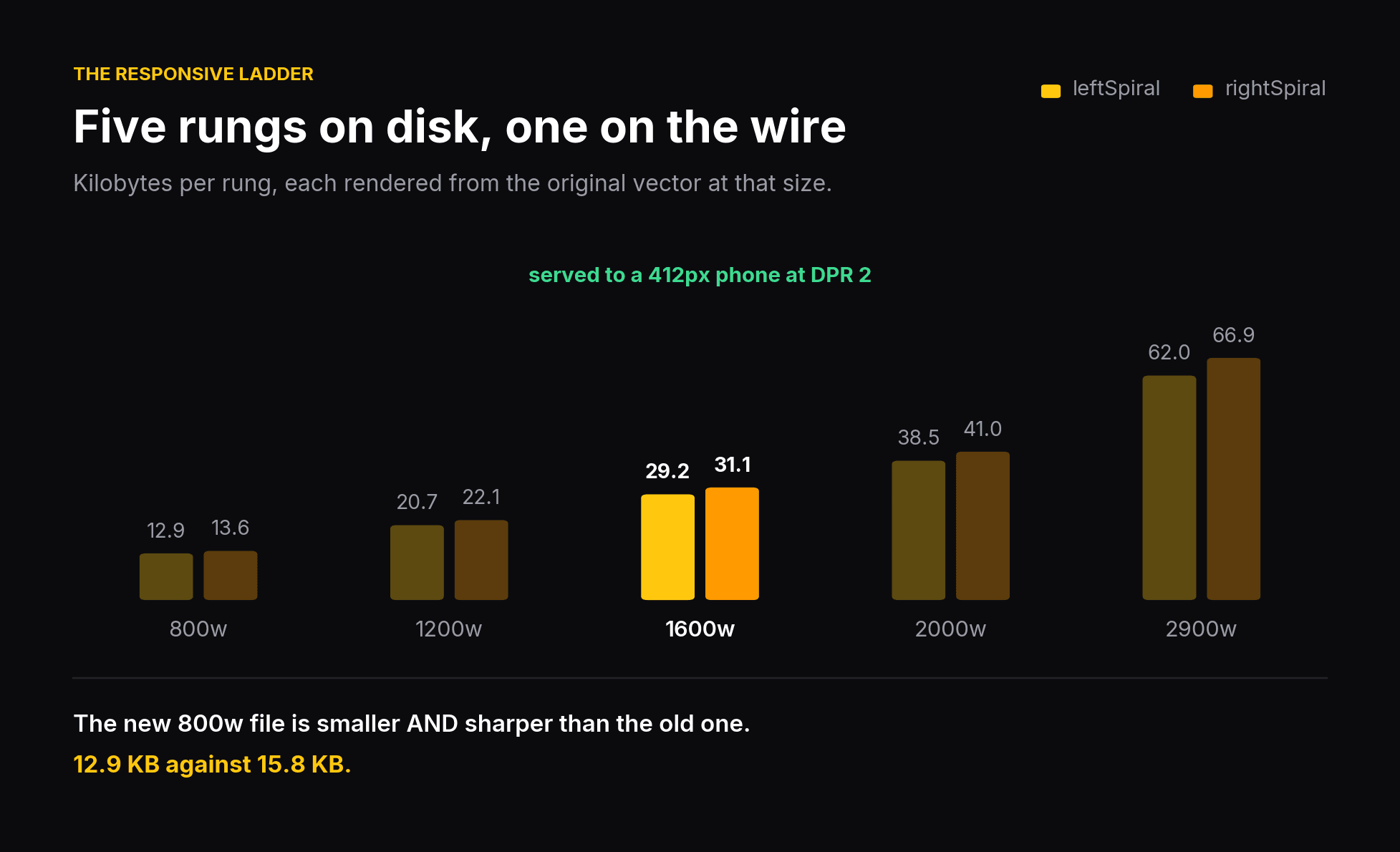 Five responsive rungs per spiral, with the rung served to a typical phone highlighted
| Condition | Needs | Serves | Weight |
|---|---|---|---|
| 1x desktop | 682 px | 800w | 12.9 KB |
| 2x phone at 390px | 1,197 px | 1200w | 20.7 KB |
| 2x phone at 412px | 1,242 px | 1600w | 29.2 KB |
| 2x at 639px | 1,942 px | 2000w | 38.5 KB |
| 3x large phone | 2,913 px | 2900w | 62.0 KB |
The sizes attribute is expressed in vw rather than per-breakpoint pixel guesses, because below the sm breakpoint the rendered width is a fixed multiple of the viewport. I measured it at about 1.52x. When a relationship is linear, describe it linearly and stop maintaining a list.
The detail I care about most: every rung is rendered from the original vector source at that exact size. Not downscaled from one large raster.
That is why the new 800w file is both smaller and sharper than the old one. 12.9 KB against 15.8 KB.
Downscaling a raster throws away detail and keeps bytes. Re-rendering from vector does the opposite. Nothing upscales now at any density.
The fonts were faking it #
The baseline loaded two Satoshi cuts, Regular and Medium, and preloaded both.
The design called for weights up to 900.
Those weights did not exist in the loaded files, so the browser synthesised them. Faux bold smears strokes without changing letter widths, which is exactly why the headings looked subtly wrong and why matching the design by eye kept failing. Satoshi ships no SemiBold cut at all, so weight 600 was literally unreachable with static files.
| Baseline | Current | |
|---|---|---|
| Files requested | 2 (Regular, Medium) | 1 (Variable) |
| Preloads | 2 | 1 |
| Transferred | 60.5 KB | 41.6 KB |
| Format | woff | woff2 |
| Weights available | 400, 500, rest faked | 300 to 900, all real |
There were also ten unreferenced .woff files, 295 KB, shipping with every deploy. Four were italic cuts and the project uses no italics anywhere.
I want to be precise about what deleting them did, because it would be easy to overstate. Nothing linked to those files, so no visitor ever downloaded one. Removing them took fonts in the deploy from 336.9 KB to 41.6 KB and total build output from 1.30 MB to 1.01 MB. Transfer on arrival stayed at exactly 256 KB, which I verified by re-measuring rather than assuming.
Dead assets are worth removing. They are not a user-facing win, and counting them as one would be inflating my own numbers.
What the browser downloads now #
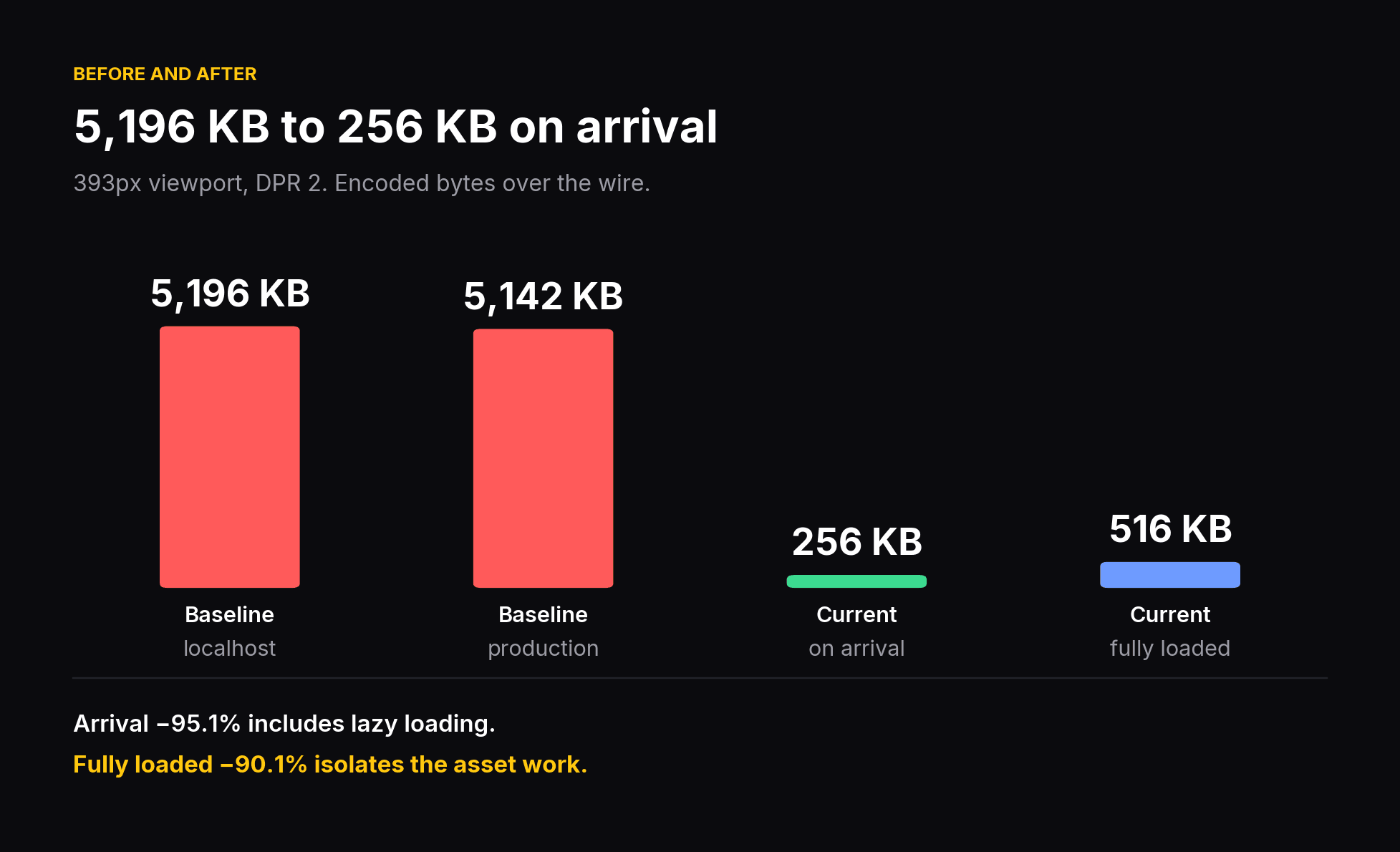 Transferred bytes: baseline on localhost and production, current on arrival and fully loaded
| Measure | Baseline | Current | Change |
|---|---|---|---|
| Transferred on arrival | 5,196 KB | 256 KB | −95.1% |
| Transferred fully loaded | 5,196 KB | 516 KB | −90.1% |
| Decoded on arrival | 11,182 KB | 479 KB | −95.7% |
| Requests on arrival | 20 | 8 | −60% |
| Build output, raw | 11.16 MB | 1.01 MB | −90.9% |
| Build output, gzipped | 5.32 MB | 778.1 KB | −85.7% |
Two "after" numbers, deliberately, because they answer different questions.
The new build lazy-loads 18 of its 25 images. The old build lazy-loaded none. So "on arrival" compares a whole page against the top of a page. That comparison is real and it is what a visitor experiences, but it quietly credits lazy loading as though it were compression.
"Fully loaded" forces every image in and isolates the asset work on its own.
Publishing both is the only version of this I would defend in an interview.
Verified in production #
| Build | Localhost | Production | Agreement |
|---|---|---|---|
| Baseline | 5,196 KB / 20 req | 5,142 KB / 20 req | within 1.0% |
| Current | 256 KB / 8 req | 260 KB / 8 req | within 1.6% |
Two independent measurements landing in the same place is what lets these be quoted without hedging.
The score that was lying #
PageSpeed Insights, both URLs, both form factors, 12 September 2026.
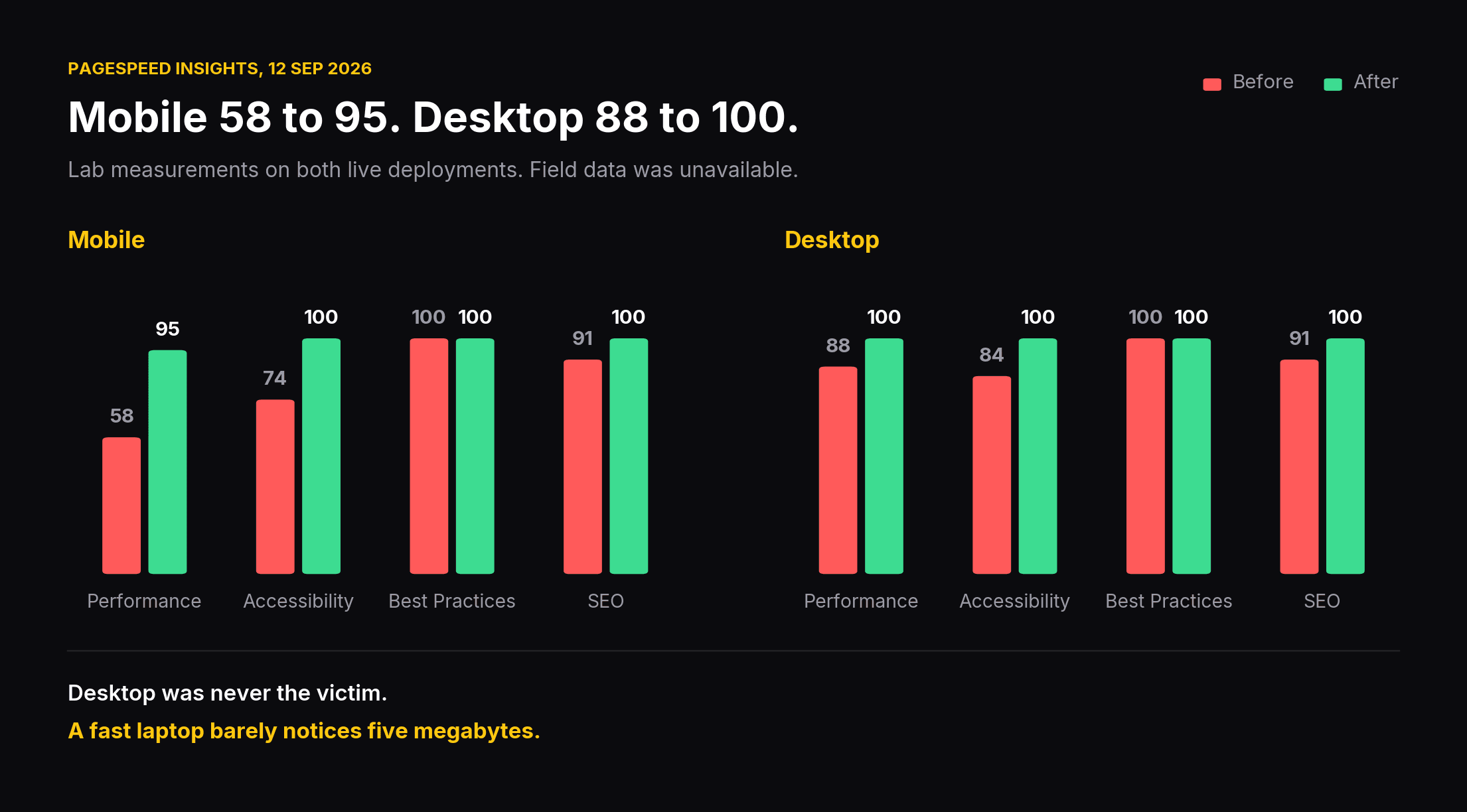 Lighthouse scores before and after, mobile and desktop
| Score | Mobile before | Mobile after | Desktop before | Desktop after |
|---|---|---|---|---|
| Performance | 58 | 95 | 88 | 100 |
| Accessibility | 74 | 100 | 84 | 100 |
| Best Practices | 100 | 100 | 100 | 100 |
| SEO | 91 | 100 | 91 | 100 |
Now look at the two baseline Performance numbers side by side.
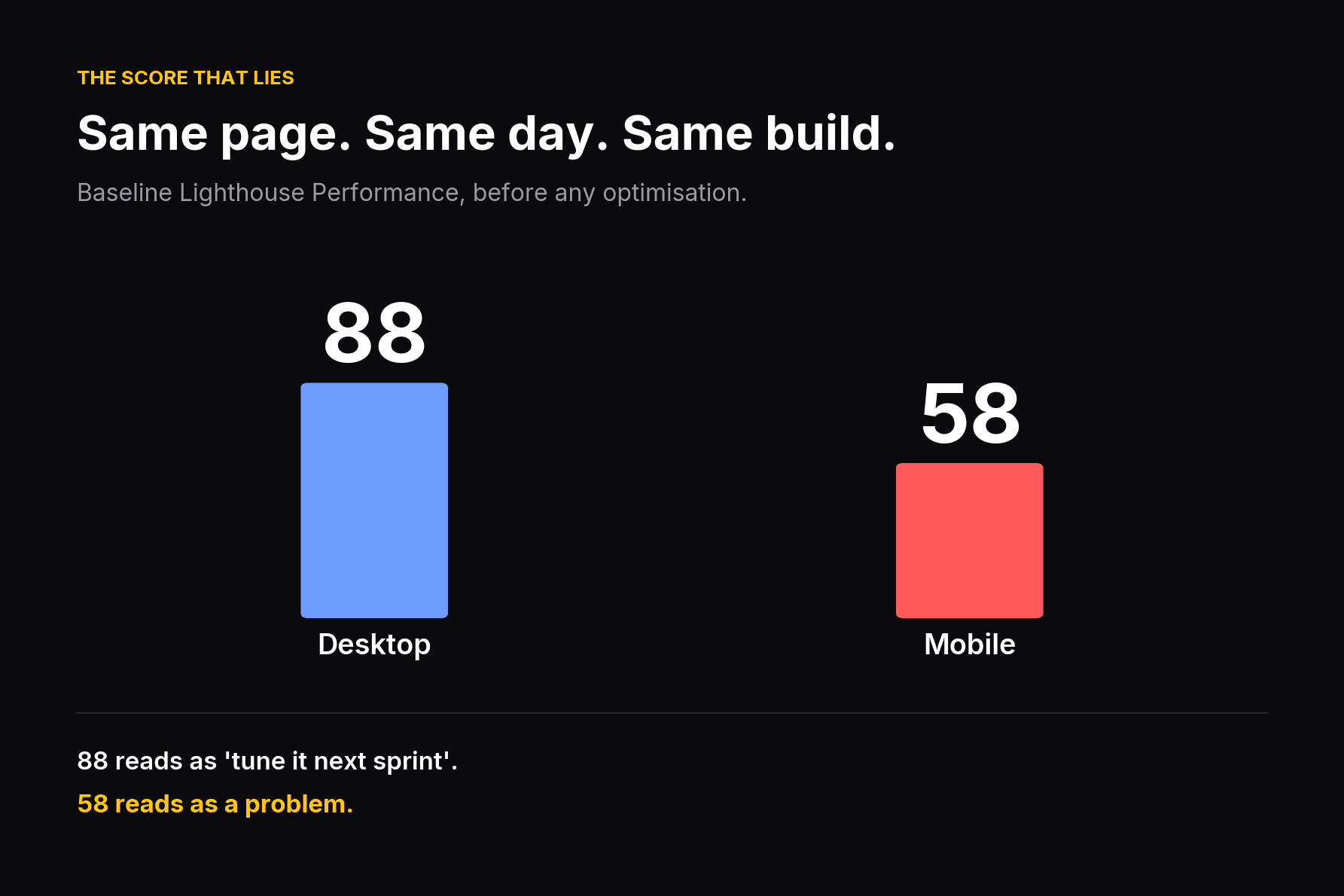 Baseline Lighthouse Performance: desktop 88, mobile 58
An 88 reads as "needs a little tuning, get to it next sprint."
A 58 reads as a problem.
Same page. Same day. Same build.
PageSpeed's mobile profile throttles CPU and network, which is precisely where a 5.1MB payload does its damage. Desktop moved from 88 to 100, which is real but undersells the work, because desktop was never the victim. A fast laptop on office wifi barely notices five megabytes. A mid-range phone on mobile data notices nothing else.
If you only ever check your desktop score, you are grading the version of your site that almost nobody uses.
One honesty note on the mobile score: it read 96 in an intermediate run and 95 in the final one. That is run-to-run variance, not a regression. Lighthouse routinely swings a point or two on identical builds, and the only change between those runs was about thirty lines of event-listener JavaScript.
Field data showed No Data for both URLs. Neither deployment has enough Chrome UX Report traffic. Everything here is lab measurement, and I would rather say so than imply I have real-user numbers I do not have.
Two things I got wrong #
I trusted localhost timings first. Three baseline runs of the load event gave 1,377ms, 1,065ms and 72ms. The last was the browser serving from cache. A figure that swings 19x between runs is noise. More importantly, localhost has no bandwidth and no CPU throttle, which deletes exactly the two costs a 5MB page imposes. Those distortions all run the same direction, so quoting them would have undersold the work. The local rig implied a modest improvement. Throttled measurement showed 58 to 95.
I assumed instead of grouping. The console.table by extension ended a two-day argument I was having with myself. It should have been the first thing I ran.
What I would do differently #
Put a build-size check in CI on day one.
Every part of this was findable at any point in the page's life, by anyone, in about ten minutes. The reason it survived to production is not that it was subtle.
It is that nothing was watching.
Compressing images is easy. Noticing is the hard part, and noticing is automatable.
Part two: two bugs that only existed on real hardware #
Two visual bugs on this page survived desktop testing and survived Chrome's mobile emulator. Both were obvious within two seconds of opening the page on a physical iPhone 15.
The interesting part is that only one of them was actually a Safari difference. I spent hours on the other one blaming an engine that was rendering it identically to Chrome.
Bug one: the sliced artwork #
Symptom. A hard straight edge cutting through the hero swirl. Mobile only. It looked like a clipping mask that had gone wrong, or an animation caught mid-transition.
I tested four hypotheses and disproved all four:
- Stacking order. Something above it with a background. No. Removing every sibling left the edge exactly where it was.
- The clip-path reveal animation. GSAP animates a reveal on that element, so a stale clip region was plausible. Disabling the animation entirely did nothing.
- WebP decoding. I had just converted these files, so of course I suspected the conversion. Swapping back to the original SVG reproduced the same edge, which was the first genuinely useful result.
- Aspect-ratio rounding. The two spirals sit side by side and I wondered whether sub-pixel rounding was leaving a seam. The seam was 99 pixels wide. Not rounding.
What it actually was #
Tailwind's preflight sets a global rule:
img {
  max-width: 100%;
}
The spiral artwork is intentionally wider than its container. It is meant to bleed. That max-width: 100% clamped each spiral to its container's width of 388px, while the image's own height demanded 587px.
object-fit: cover was then handed a box whose shape did not match the image's shape. It did what cover does: scaled the art until it filled the box, and cropped the overflow. Roughly 99px came off each side, and because the container was narrower than the visual composition, that crop edge landed inside the visible card rather than safely outside it.
The fix is two utilities:
<img className="max-w-none shrink-0" ... />max-w-none lifts the clamp. shrink-0 stops flex from re-squeezing it afterwards.
Why it looked like a mobile bug #
Desktop was wide enough that the image's natural width never reached the clamp, so nothing was ever cropped.
The bug existed in Chrome too. It always had. Chrome just sliced it somewhere that happened to read as part of the illustration rather than as an error.
That is the uncomfortable version of this story, and it is the one worth keeping: this was never an engine difference. It was a framework's own CSS reset, applying equally in every browser, doing exactly what it says it does.
Bug two: the off-centre pillars #
Symptom. The gateway band's twelve pillars sit visibly left of centre on iPhone. Perfectly centred in the emulator at the same viewport width.
The design #
Twelve pillars form a symmetric valley. Their heights, in order:
80 68 56 44 32 20 20 32 44 56 68 80
The stage they sit on is deliberately wider than a phone, minimum 1,136px, and is meant to be cropped from both sides like a background image. At a 393px viewport only about four pillars are visible, and the intent is that you see the symmetric middle of the trough.
What it actually was #
The stage was centred with justify-content: center.
Centring an item that overflows its flex container depends on the browser spilling that overflow in both directions. Chrome does. Safari aligns the overflowing content to the start instead, so the crop window landed on pillars 0 through 3 rather than the middle.
Pillars 0 through 3 are 80 68 56 44. A descending staircase.
The tell #
This is the part I would keep if I could only keep one thing from this project.
I did not diagnose this from devtools. I diagnosed it from a screenshot, because the heights are all different and therefore the pillars are self-identifying.
A correctly centred crop of a symmetric trough produces a symmetric shape: down, then up. The screenshot showed a pure descending staircase. That is only possible if the visible window starts at pillar 0. From there the offset was arithmetic, not investigation.
When a layout has a known pattern, a screenshot carries more information than it looks like it does.
The fix #
// on a wrapper, not on the animated row itself
<div className="absolute left-1/2 -translate-x-1/2">
  <div ref={rowRef}>{/* GSAP animates scaleX here */}</div>
</div>
left-1/2 plus -translate-x-1/2 is engine-independent. It does not rely on overflow distribution behaviour at all.
The transform has to sit on a wrapper because GSAP animates the row's scaleX, and a transform on the same element would be overwritten on the first animation frame.
What a device emulator actually is #
"iPhone 15" in a Chromium devtools panel is Chromium at 393 pixels wide, with a touch event shim and a spoofed user agent.
It is a viewport size. It is not a rendering engine. It will render a WebKit layout bug perfectly correctly and report your page as fine, because it is not WebKit.
That is true and it is worth knowing.
The counterweight, which matters more #
Of these two bugs, exactly one was a genuine engine difference.
The other was ordinary CSS from a framework reset, behaving identically everywhere, and I lost hours to it because "only breaks on iPhone" pattern-matched to "Safari problem" and I stopped thinking.
Both errors are expensive. Assuming the emulator is the device costs you real bugs in production. Assuming every mobile-only symptom is an engine difference costs you hours chasing an innocent browser.
The order that works:
- Read the computed styles on the actual element. Not the styles you wrote, the ones that won.
- Check whether the symptom reproduces in the other engine at the same width, even subtly. If it does, it is not an engine difference.
- Only then start comparing engine behaviour.
Rule out the boring explanation first. It is usually the boring explanation, and when it is not, you will have eliminated it cheaply.
The order that works, as a loop:
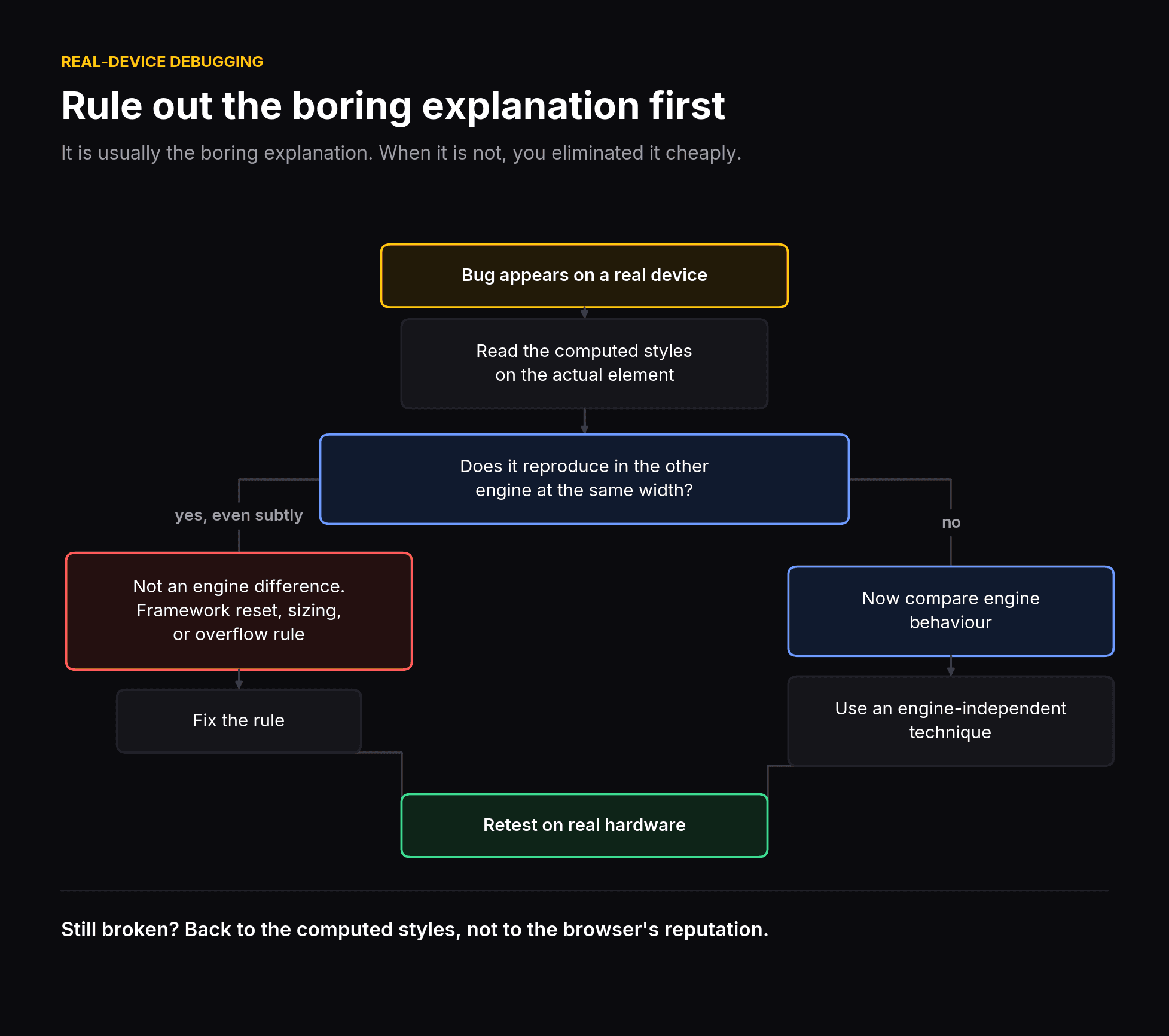 Loop for debugging a bug that only appears on a real device
Testing on real hardware is not optional #
Neither of these bugs required a device lab. It required one phone, plugged in, with Safari's Web Inspector attached from a Mac.
If you build for a market where most traffic is mobile, and especially if it is mobile on hardware that is not the newest, the emulator is a convenience for layout iteration and nothing more. The last check has to happen on glass.
Part three: a perfect accessibility score, and a menu with no keyboard exit #
The page scored 100 for Accessibility on both mobile and desktop.
Then I tabbed through it by hand. The mobile menu had no keyboard exit. Focus never entered it. Escape did nothing. Three Tab presses landed on links hidden behind the overlay.
The score was 100 the whole time.
First, the cheap wins, because they were absurdly cheap #
The performance work above took days. Before the manual audit, two Lighthouse categories went to 100 in about ten minutes.
Two audits were failing on the baseline:
- Image elements do not have
[alt]attributes, on nine images: eight decorative card graphics in the features grid, plus the navbar logo. This was also the sole failing SEO audit, which is why SEO sat at 91. - Document does not have a main landmark. The page had no
mainelement at all.
The fixes:
Eight decorative images got alt="", which is the correct marking for artwork that carries no information. An empty alt tells a screen reader to skip it. A missing alt makes the reader announce the filename.
The navbar logo got alt="Razor Wallet" rather than an empty string, and that decision is worth a sentence. The wordmark beside the logo is hidden md:block. Below that breakpoint the logo image is the only brand identification on the page, so an empty alt would have left mobile screen-reader users with no idea whose site they were on.
The content wrapper became a main element.
| Before | After | |
|---|---|---|
| Accessibility, desktop | 84 | 100 |
| Accessibility, mobile | 74 | 100 |
| SEO, both | 91 | 100 |
Nine attributes and one element. That is the whole change.
It is worth sitting with how disproportionate that is. Accessibility basics are close to free relative to their score impact, and the overwhelming majority of projects skip them anyway.
The mobile score stalled at 89, and the reason was good #
For one round, desktop hit 100 and mobile stopped at 89.
The failing audit was buttons do not have an accessible name, on the navbar hamburger:
<button className="text-2xl block md:hidden text-white">
  <RiMenuLine />
</button>
It is md:hidden. Desktop never renders it, so desktop never had the problem. An icon-only button with no text and no aria-label is announced by a screen reader as, simply, "button".
The generalisable version of this, and I think it is a strong one: a per-form-factor score difference is usually a per-form-factor element difference. Scoring 100 on desktop told me nothing at all about a control that only exists on phones.
Labelled, mobile went 89 to 100.
Then the score went down, and the page got more honest #
Desktop Best Practices dropped from 100 to 96 after the image optimisation. One failing audit: Displays images with incorrect aspect ratio.
My first guess was the hero spirals, since they use object-fit: cover at a width that deliberately does not match their natural ratio. I measured. The spirals are 0.0% off. Perfectly proportional.
The actual culprit was a single feature-card image, and here is what it looked like measured on both builds:
| Baseline | Current | |
|---|---|---|
| File | seventh.svg | seventh.webp |
| Natural ratio | 0.813 | 0.814 |
| Layout ratio | 0.718 | 0.718 |
| Distortion | 11.7% | 11.7% |
object-fit | fill | fill |
The image is stretched by 11.7% in both builds. Identically. It carries w-full h-full with no object-fit, forcing both dimensions, and it has been squashed for the entire life of the page.
Lighthouse's aspect-ratio audit skips SVG, because vector images have no meaningful intrinsic ratio for that check. It applies to raster.
So converting the file to WebP did not break the image. It made an existing defect detectable.
I had not broken anything. I had made an old bug visible.
The fix had to change the design #
Adding object-cover to that one image took desktop Best Practices back to 100. The card now crops about 6% horizontally instead of squashing 11.7%.
That is a genuine visual change, and there is no fix that preserves the previous appearance. You can crop the image or you can squash it. There is no third option, because the previous appearance was the bug.
I think this is the most interesting thing in the whole project, and it generalises further than it looks: changing a file format can surface defects that were always there. The tooling around one format checks things the tooling around another format skips. A score dropping after a migration is not automatically a regression. Sometimes it is the first honest reading you have had.
The manual keyboard walkthrough #
Accessibility was at 100 on both form factors. Lighthouse itself publishes a list of items it cannot check automatically. So the obvious next move was to read that list and do it by hand: tab through the page with real key presses and watch what happens.
What passed #
Desktop tab order was clean:
Docs → Apple → Google → Download → Download for Chrome → X → Discord
Every stop matched :focus-visible, carried a visible ring, and scrolled into view. No traps, nothing skipped, no tabindex hacks.
One caveat I want on the record: there are zero focus styles defined anywhere in this project. That ring is purely the browser default. It works, and it is a default rather than a decision, which is a different thing.
What failed #
The mobile menu is a full-screen overlay. Opening it with a keyboard produced three separate failures.
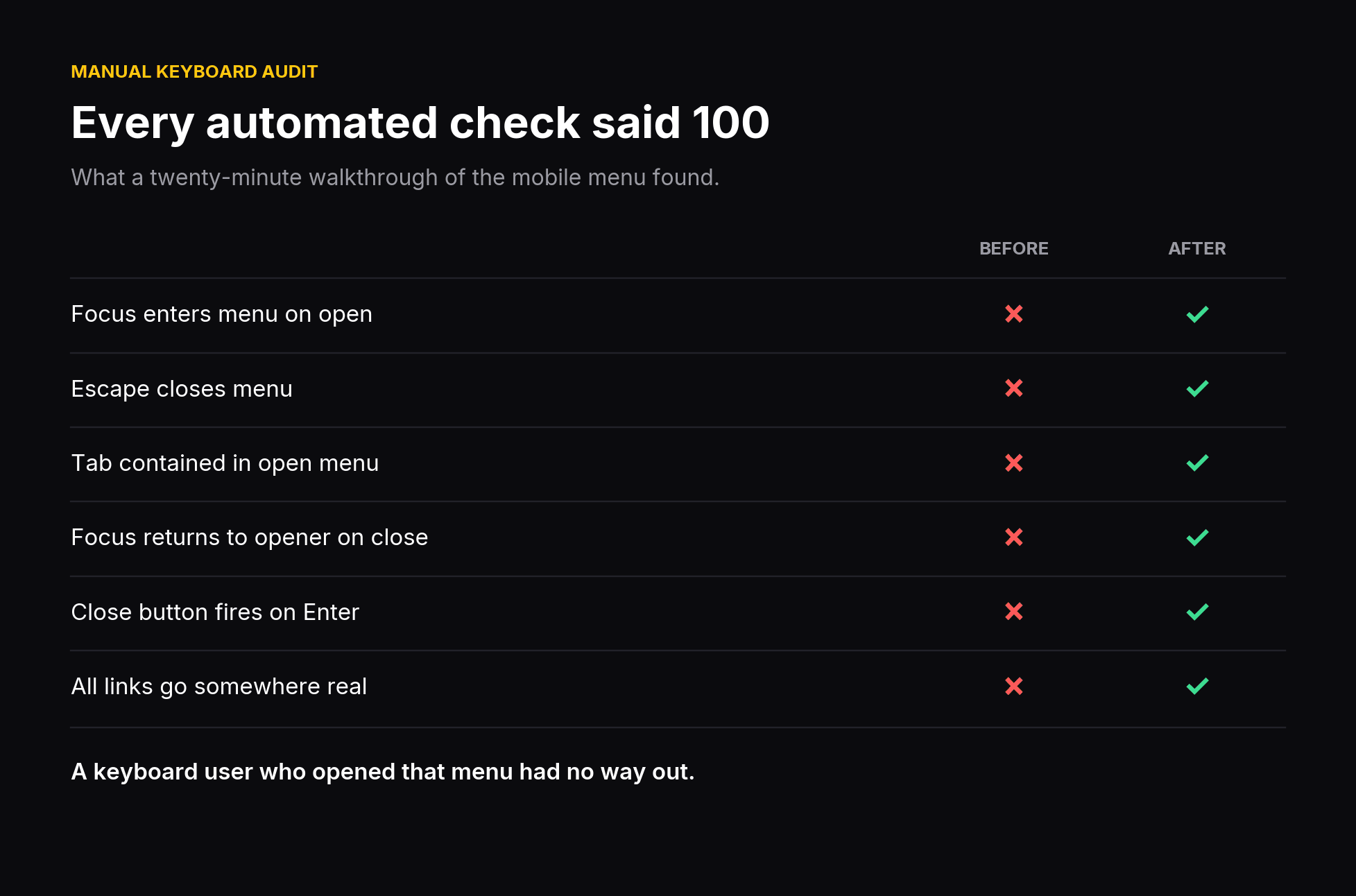 Manual keyboard audit results, before and after
| Behaviour | Result |
|---|---|
| Focus moves into the menu on open | No. Stayed on the hamburger, now underneath the overlay |
| Escape closes it | No. No key handler existed |
| Tab stays inside | No. Three presses landed on page links behind the overlay |
The mechanism is DOM order.
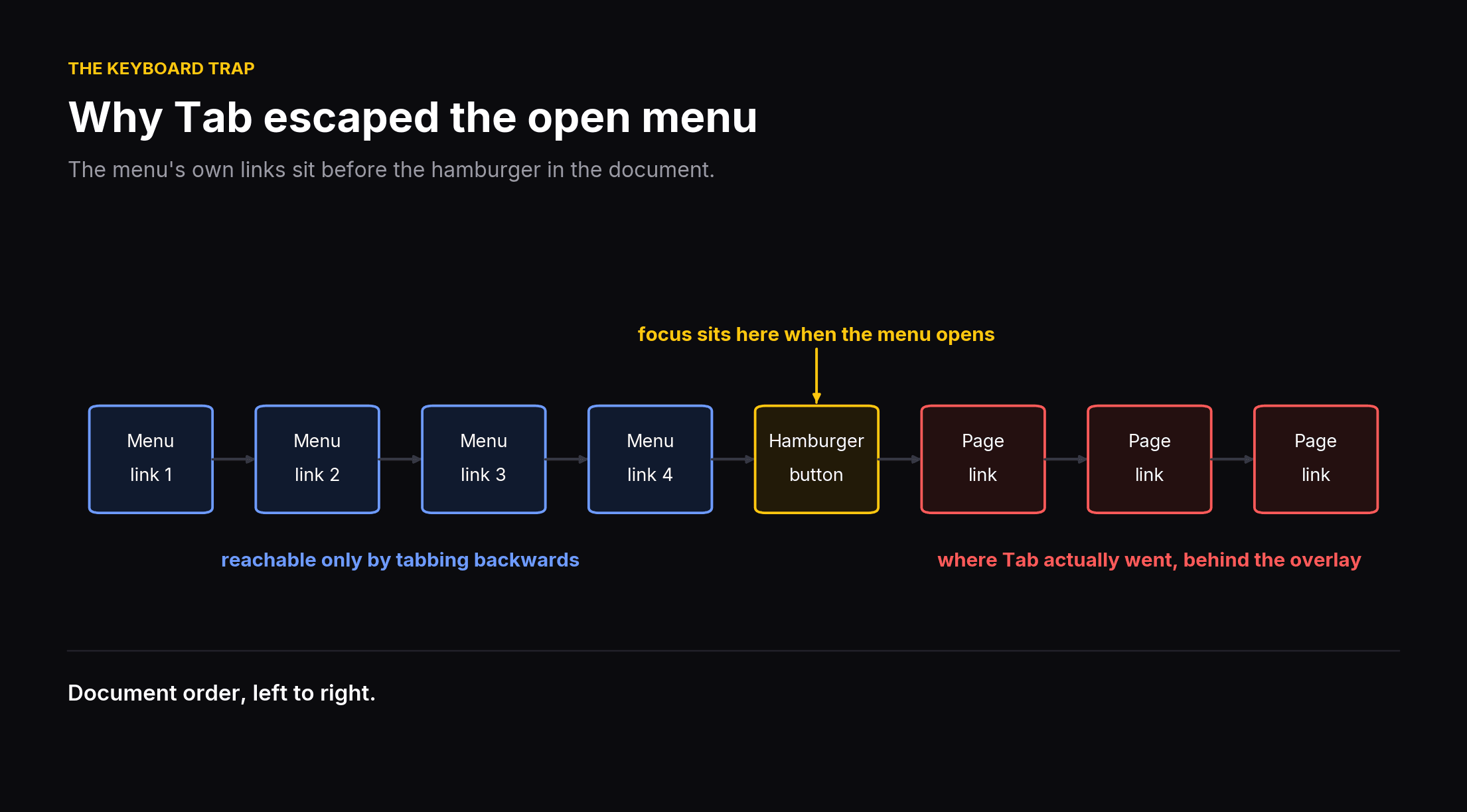 Document order showing why Tab escaped the open menu
The menu's own links sit before the hamburger in the document. With focus left sitting on the hamburger, Tab moves forward into the page behind the overlay, and the menu's four links were reachable only by tabbing backwards.
A keyboard user who opened that menu was tabbing through invisible links under a black screen, with no way out.
And the close button did not work either #
Found the same day, in the same pass:
<button className="ml-auto block text-2xl">
  <RiCloseLargeLine onClick={() => setOpen(false)} />
</button>
The click handler is on the icon, not on the button.
A mouse user clicks the icon and it works, so nobody noticed. A keyboard user tabs to the button, presses Enter, and the button fires its own click event, which has no handler. Nothing happens.
Combined with the focus problems above, the menu was effectively unusable without a mouse. Every automated score said 100.
Why the score could not catch any of this #
Two reasons, and both are structural rather than a gap in Lighthouse's coverage.
The close button was not in the DOM during the audit. It only exists once the menu is open. Lighthouse audits the page as loaded. An automated score cannot test a state it never enters, and a 100 means the automated checks passed on the one state the crawler happened to see.
Focus order, focus return and Escape handling are not audited at all. They are on Lighthouse's own published list of items to check manually. The tool is not failing here. It is telling you, in the report, that it has not checked.
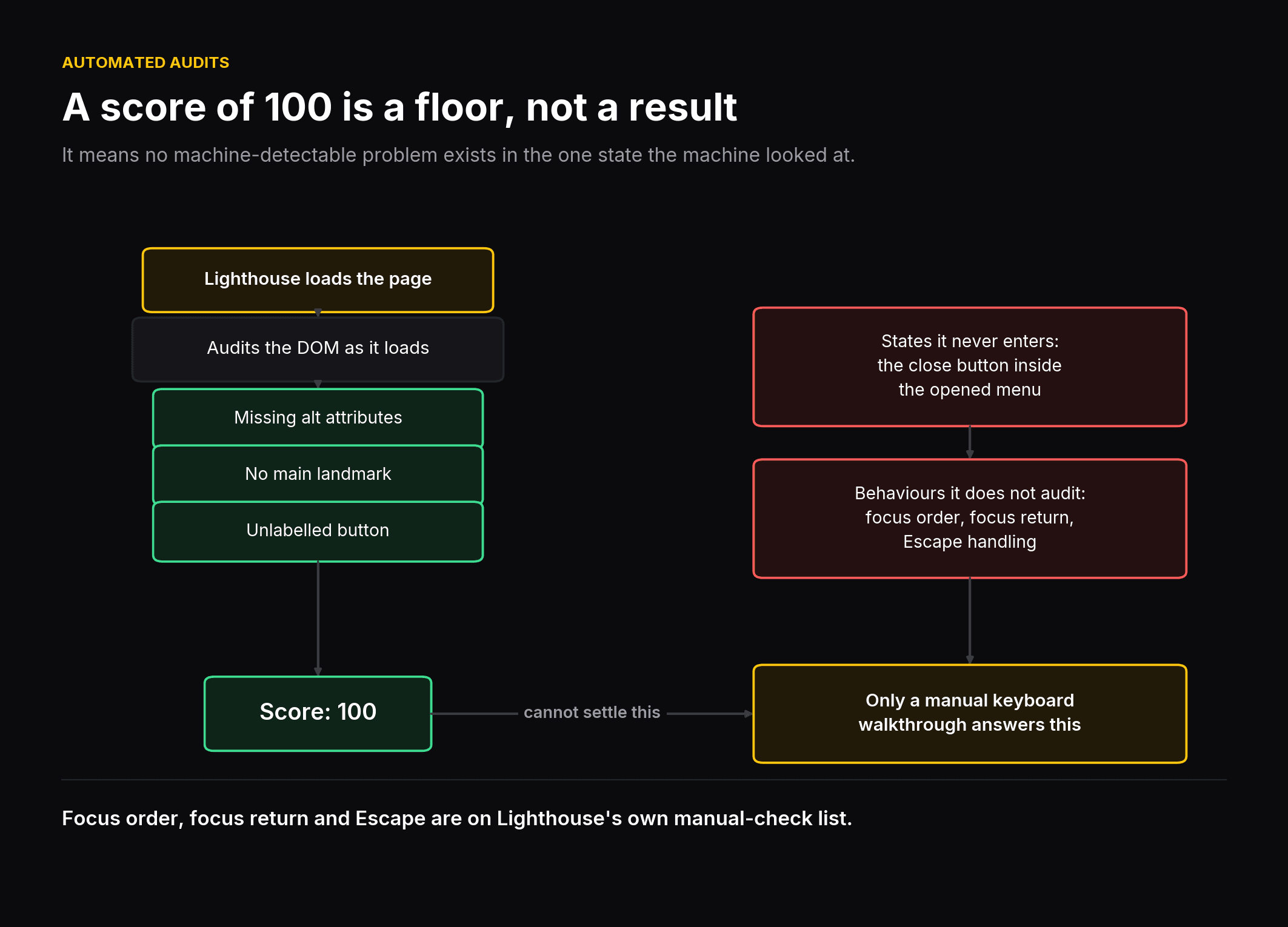 What an automated accessibility audit can and cannot see
The fix #
Standard dialog semantics, nothing exotic:
role="dialog"andaria-modal="true"on the overlay- Focus moved into the menu on open
- Tab wrapped at both ends so it cannot escape
- Escape dismisses
- Focus returned to the hamburger on close
- The click handler moved onto the button element where it belongs
Then verified with the same real key presses that exposed the problem, because a fix you have not reproduced the bug against is a hypothesis.
Four links that went nowhere #
The same pass found that four of seven links had no destination. Two carried href="#", which jumps to the top of the page. Two carried href="", which resolves to the current URL, so activating one silently reloaded the page. Nobody had noticed, because nobody clicks a logo twice.
The social links got their real URLs.
The app-store badges had their href removed entirely rather than pointed somewhere plausible. Without an href, an anchor is not focusable and is not announced as a link, which is the honest state for a destination that does not exist yet. Pointing it at # would have left a tab stop that promises something and delivers nothing.
Desktop tab stops went from 7 to 5, and all five now go somewhere real.
What I take from this #
A perfect automated accessibility score is a floor, not an achievement. It means no machine-detectable problem exists in the single state the machine looked at.
The manual walkthrough took about twenty minutes. It found a broken feature, a dead button, and four dead links, none of which any automated tool flagged and none of which it could have.
If you have a site with a mobile menu, you can check the important part right now. Open the menu with a keyboard. Press Escape. Press Tab five times and watch where focus goes.
A worrying number of people are going to find what I found.
Appendix: the measurement rig #
My second and third baseline runs reported 0 KB transferred.
That is a thrilling result, and it means I measured my own cache. Here is the rig that eventually produced numbers I would defend, and the four ways I got it wrong first.
The idea in one sentence #
Build the old commit and the new commit as production bundles, serve them at the same time on different ports, and load both while the browser reports what it downloaded.
The commands #
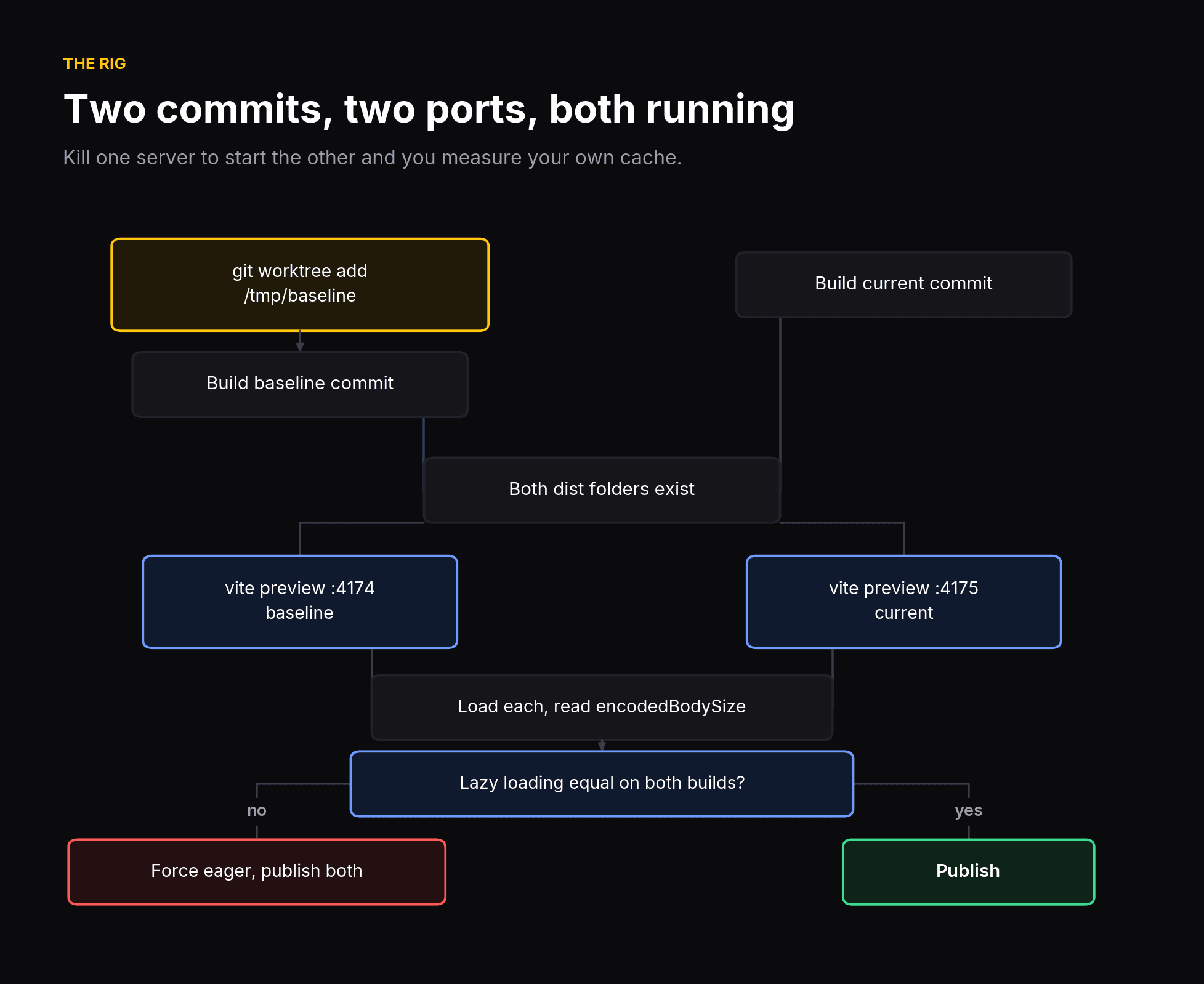 The measurement rig: two commits, two ports, both servers running
# 1. build the "before" without touching your working tree
git worktree add /tmp/baseline <baseline-commit>
cd /tmp/baseline && pnpm install --frozen-lockfile && npm run build

# 2. build the "after"
cd ~/your/project && npm run build

# 3. serve both AT ONCE, on different ports
npx vite preview --port 4174 --outDir /tmp/baseline/dist   # terminal 1
npx vite preview --port 4175                               # terminal 2

# 4. open each and run the console snippet below

# 5. clean up
cd ~/your/project && git worktree remove /tmp/baseline --force
git worktree is the part worth stealing if you take nothing else. It checks out an old commit into a separate directory without stashing, without switching branches, and without disturbing anything you have in progress.
The measurement #
const res = performance.getEntriesByType('resource');
const encoded = res.reduce((a, r) => a + (r.encodedBodySize || 0), 0);
const decoded = res.reduce((a, r) => a + (r.decodedBodySize || 0), 0);

console.table({
  requests:  res.length,
  encodedKB: Math.round(encoded / 1024),  // over the wire
  decodedKB: Math.round(decoded / 1024),  // after gunzip
});
Then group it by file type. This is the line that ended an argument I was having with myself about whether the animation library was the problem:
const by = {};
performance.getEntriesByType('resource').forEach(r => {
  const ext = r.name.split('?')[0].split('.').pop().toLowerCase();
  by[ext] = (by[ext] || 0) + (r.encodedBodySize || 0);
});
console.table(by);
It took under a minute to write. It should have been the first thing I ran.
Trap 1: reusing a port #
Different ports are different origins with different caches.
Serve the baseline on a port, kill it, serve the new build on the same port, and the browser happily reuses cached entries from the previous build. This is how I got 0 KB.
Two ports. Both servers running at once. Do not kill one to start the other.
Trap 2: using transferSize #
It sounds like the right property. The name is literally what you want to know.
It drops to approximately 0 the moment anything is served from cache, which makes it useless for exactly the comparison you are trying to run.
encodedBodySize reports the real compressed body whether it arrived from the network or from disk. Use that.
Trap 3: forgetting lazy loading #
My first result was a 95% win that quietly took credit for lazy loading as though it were compression.
Check before you believe it:
document.querySelectorAll('img[loading="lazy"]').lengthMine was 0 on the baseline and 18 on the current build. Those are not the same page measured twice. One is a whole page and the other is the top of a page.
Force everything in and re-measure:
document.querySelectorAll('img').forEach(img => {
  img.loading = 'eager';
  if (!img.complete || img.naturalWidth === 0) {
    const src = img.currentSrc || img.src;
    img.src = '';
    img.src = src;
  }
});
Publish both numbers. "On arrival" is what a visitor experiences. "Fully loaded" isolates the asset work. They answer different questions and quoting only the flattering one is how performance posts lose credibility.
Trap 4: summing srcset rungs #
If an image ships as five responsive sizes, the directory holds five files and the visitor downloads one.
A per-asset table that sums all five understates your result by a factor of five. A per-visitor table that quotes one rung overstates your disk footprint by the same factor.
Neither is wrong. Say which one you are quoting.
Pairing hashed filenames #
Vite hashes output names, so pairing before-and-after files means stripping the hash first:
import os, re, sys

def index(d):
    out = {}
    for f in os.listdir(d):
        stem = re.sub(r'-[A-Za-z0-9_-]{8,}(\.[a-z0-9]+)$', r'\1', f)
        stem, _ = os.path.splitext(stem)
        out.setdefault(stem, []).append(os.path.getsize(os.path.join(d, f)))
    return out

before, after = index(sys.argv[1]), index(sys.argv[2])

for stem, sizes in sorted(before.items(), key=lambda kv: -sum(kv[1])):
    b = sum(sizes)
    a = sum(sum(v) for k, v in after.items()
            if k == stem or re.fullmatch(re.escape(stem) + r'-\d+', k))
    if a and b > a * 1.2:
        print(f"{stem:<14}{b/1024:>10,.1f} KB{a/1024:>10,.1f} KB{(1-a/b)*100:>8.1f}%")
The -\d+ alternative in the match is what pairs one baseline file against its five responsive descendants.
Why I did not publish the localhost timings #
This is the part I feel most strongly about.
Bytes are a property of the page. Timing is a property of the page multiplied by network, device, and cache state. Only one of those four things changed.
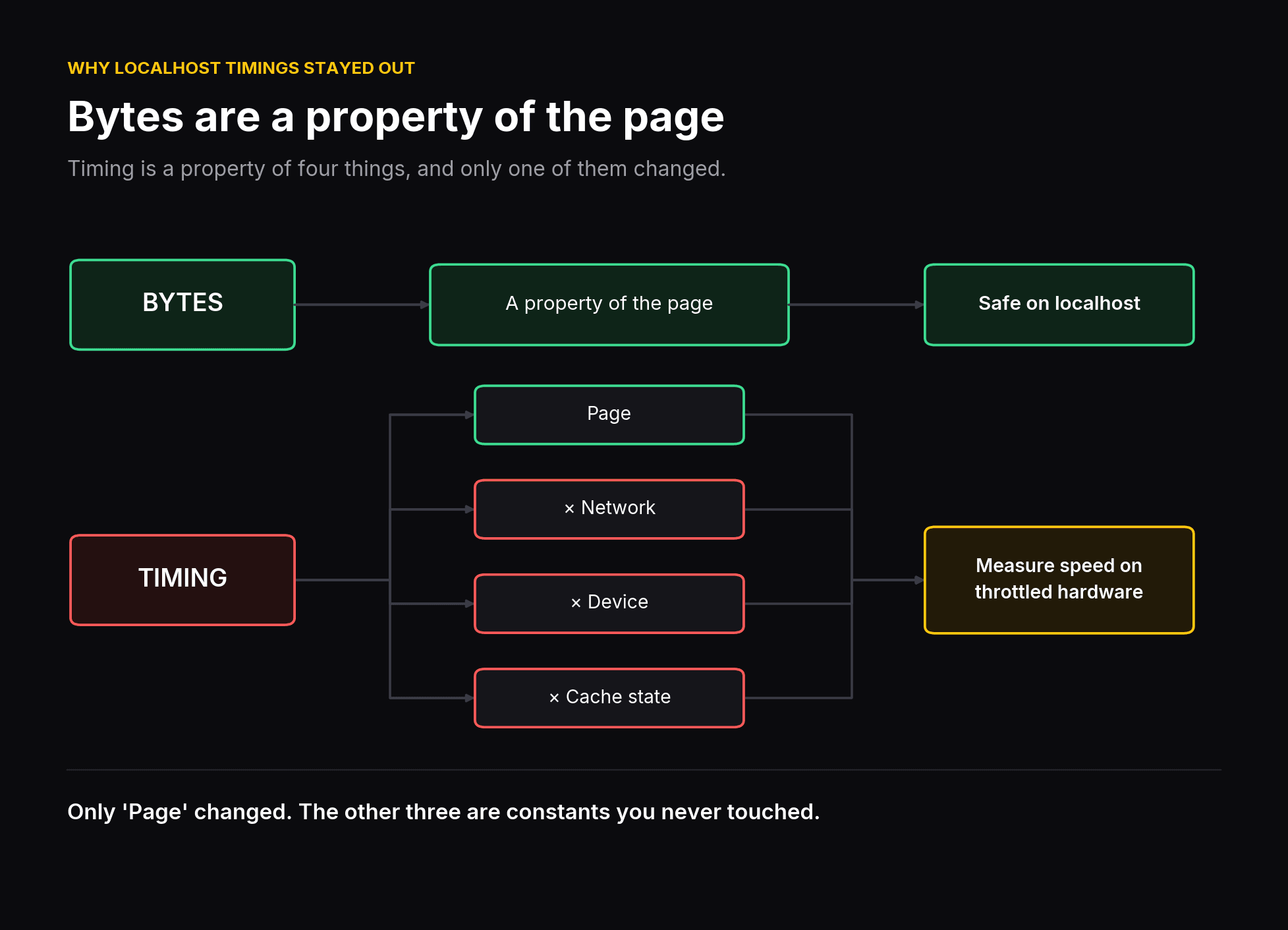 Bytes are a property of the page; timing depends on network, device and cache
Three concrete problems with the local load event:
It is unstable. Three baseline runs gave 1,377ms, 1,065ms and 72ms. The last is cache. A figure that swings 19x between runs is not a measurement.
There is no bandwidth. Localhost transfers at memory speed. But the entire problem with a 5MB page is that 5MB takes time to arrive: roughly 8 seconds of pure download on a 5 Mbps connection against about 0.05s locally. Localhost deletes the single dominant cost.
There is no CPU throttle. A dev laptop parses 10.9MB of decoded SVG far faster than a mid-range phone does.
Notice that all three distortions run the same direction. Localhost removes transfer time and CPU cost, which is precisely what the optimisation fixed. Quoting those numbers would have undersold the work.
That was borne out. The local rig implied a modest improvement. Throttled mobile measurement in PageSpeed Insights showed 58 to 95.
Refusing the convenient number turned out to be the more impressive choice as well as the correct one.
The rule #
Measure bytes locally. Measure speed on throttled hardware. Never let one stand in for the other.
And verify against production before you publish. My localhost and production figures agreed within 1.6%, which is the only reason I am willing to state them without hedging.
Still open #
Lighthouse's mobile report still names three opportunities I have not acted on:
| Opportunity | Estimated saving |
|---|---|
| Render-blocking requests | 300 ms |
| Improve image delivery | 230 KiB |
| Reduce unused JavaScript | 45 KiB of a 118 KiB bundle |
"Improve image delivery" still showing 230 KiB after a 94% image reduction is a useful reminder that there is usually a second pass available.
Sources for the studies cited above: Vodafone case study, web.dev · Milliseconds Make Millions, Deloitte · The business impact of Core Web Vitals, web.dev